> ## Documentation Index
> Fetch the complete documentation index at: https://docs.vizra.ai/llms.txt
> Use this file to discover all available pages before exploring further.
# Vizra Cloud
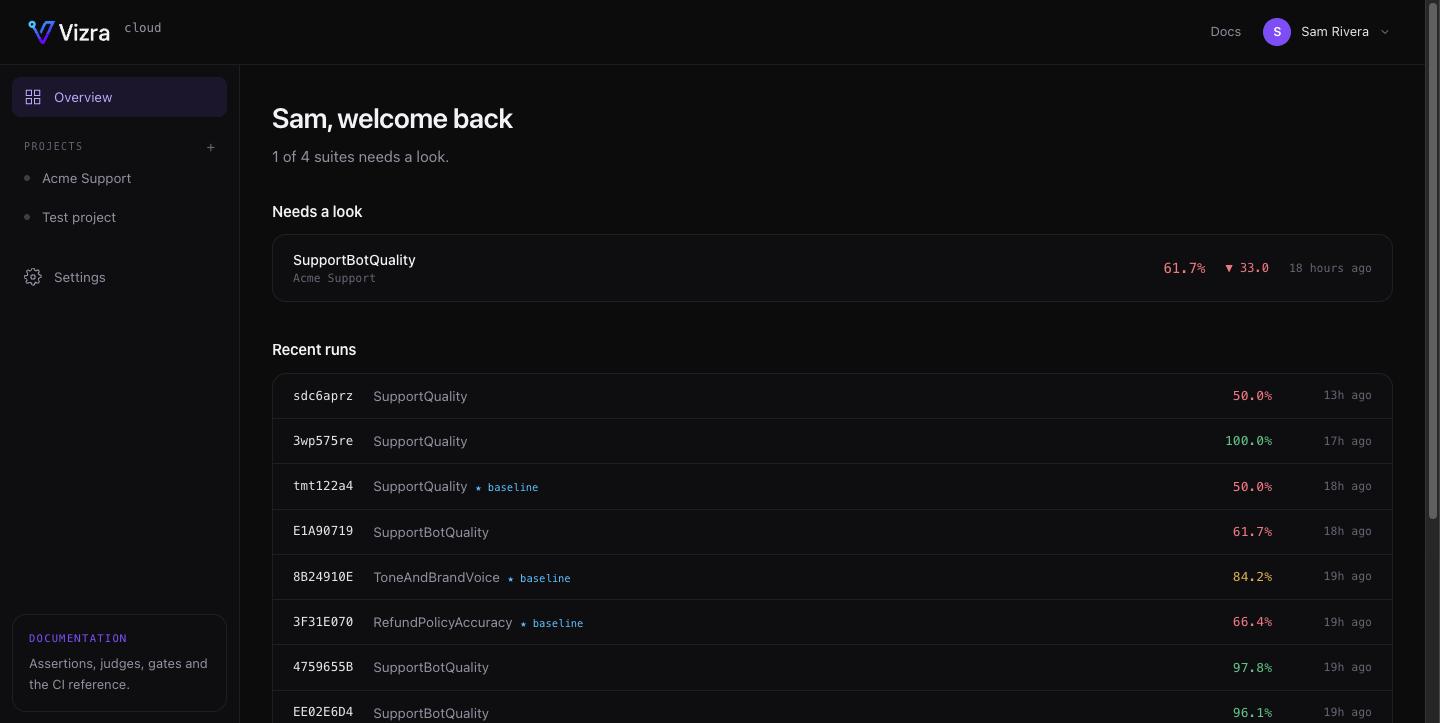
> Your team's eval history in one place — laptop runs, CI runs, and the ability to run a suite from the browser.
Vizra Cloud is the hosted counterpart to `vizra/evals`. Same engine, same tables, same
scores — it just keeps them somewhere your whole team can see, across every environment
your evals run in.
 ## Local recording happens either way
This is the part worth being precise about, because it decides whether you need Cloud at
all:
| | When it happens | Where it lands |
| ------------------- | ----------------------------------- | -------------------------------------------------------------- |
| **Local recording** | Always. Every run, no configuration | Your own database → the `/evals` [dashboard](/evals/dashboard) |
| **Cloud recording** | Only when an API key is configured | vizra.ai |
Nothing about installing `vizra/evals` sends us anything. Runs persist to your tables and
the local dashboard reads them, key or no key. Cloud is additive: set
[`VIZRA_CLOUD_KEY`](/cloud/connect) and finished runs are *also* pushed to your project.
Nothing executes on our side. Your evals run in your app, against your models, with your
keys. Cloud stores what your runs produced — which is why it never becomes a runtime
dependency of your test suite, and why an outage on our end cannot break your build.
## What the key actually buys
* **One history across every environment.** A run from your laptop, a run from CI and a run
someone triggered from the browser all land in the same suite, tagged with the
[environment](/cloud/reporting#environments) they came from — so "does this pass on main"
and "does this pass on my branch" stop being the same number.
* **Your team's runs, not just yours.** The local dashboard shows what your machine did.
Cloud shows what everyone's did.
* **Triage first.** The overview leads with suites that fell below their baseline or broke
outright, worst first, across every project — rather than leaving you to click into each
one and read the score.
* **CI context.** Runs carry the build URL, branch and pull-request number, detected
automatically from GitHub, GitLab, CircleCI or Buildkite.
* **[Dataset editing](/cloud/datasets).** Change a test question in the browser, run the
variant, and export it back to your repository — without booking a developer's afternoon.
* **[Running a suite from the dashboard](/cloud/triggering)**, on your own infrastructure.
## Every tier records
Runs are never metered and reporting is never rate-limited — on any plan, including the
free one. The [plans](/cloud/plans) differ on projects, seats and how long per-sample
detail is kept, not on whether your evals are allowed to report.
Project, key, `.env` — and your next run appears.
Which surfaces push, what's in the payload, and how to send less.
Fix a test question in the browser, commit it back to the repo.
Limits, and exactly what ages out.
## Local recording happens either way
This is the part worth being precise about, because it decides whether you need Cloud at
all:
| | When it happens | Where it lands |
| ------------------- | ----------------------------------- | -------------------------------------------------------------- |
| **Local recording** | Always. Every run, no configuration | Your own database → the `/evals` [dashboard](/evals/dashboard) |
| **Cloud recording** | Only when an API key is configured | vizra.ai |
Nothing about installing `vizra/evals` sends us anything. Runs persist to your tables and
the local dashboard reads them, key or no key. Cloud is additive: set
[`VIZRA_CLOUD_KEY`](/cloud/connect) and finished runs are *also* pushed to your project.
Nothing executes on our side. Your evals run in your app, against your models, with your
keys. Cloud stores what your runs produced — which is why it never becomes a runtime
dependency of your test suite, and why an outage on our end cannot break your build.
## What the key actually buys
* **One history across every environment.** A run from your laptop, a run from CI and a run
someone triggered from the browser all land in the same suite, tagged with the
[environment](/cloud/reporting#environments) they came from — so "does this pass on main"
and "does this pass on my branch" stop being the same number.
* **Your team's runs, not just yours.** The local dashboard shows what your machine did.
Cloud shows what everyone's did.
* **Triage first.** The overview leads with suites that fell below their baseline or broke
outright, worst first, across every project — rather than leaving you to click into each
one and read the score.
* **CI context.** Runs carry the build URL, branch and pull-request number, detected
automatically from GitHub, GitLab, CircleCI or Buildkite.
* **[Dataset editing](/cloud/datasets).** Change a test question in the browser, run the
variant, and export it back to your repository — without booking a developer's afternoon.
* **[Running a suite from the dashboard](/cloud/triggering)**, on your own infrastructure.
## Every tier records
Runs are never metered and reporting is never rate-limited — on any plan, including the
free one. The [plans](/cloud/plans) differ on projects, seats and how long per-sample
detail is kept, not on whether your evals are allowed to report.
Project, key, `.env` — and your next run appears.
Which surfaces push, what's in the payload, and how to send less.
Fix a test question in the browser, commit it back to the repo.
Limits, and exactly what ages out.